
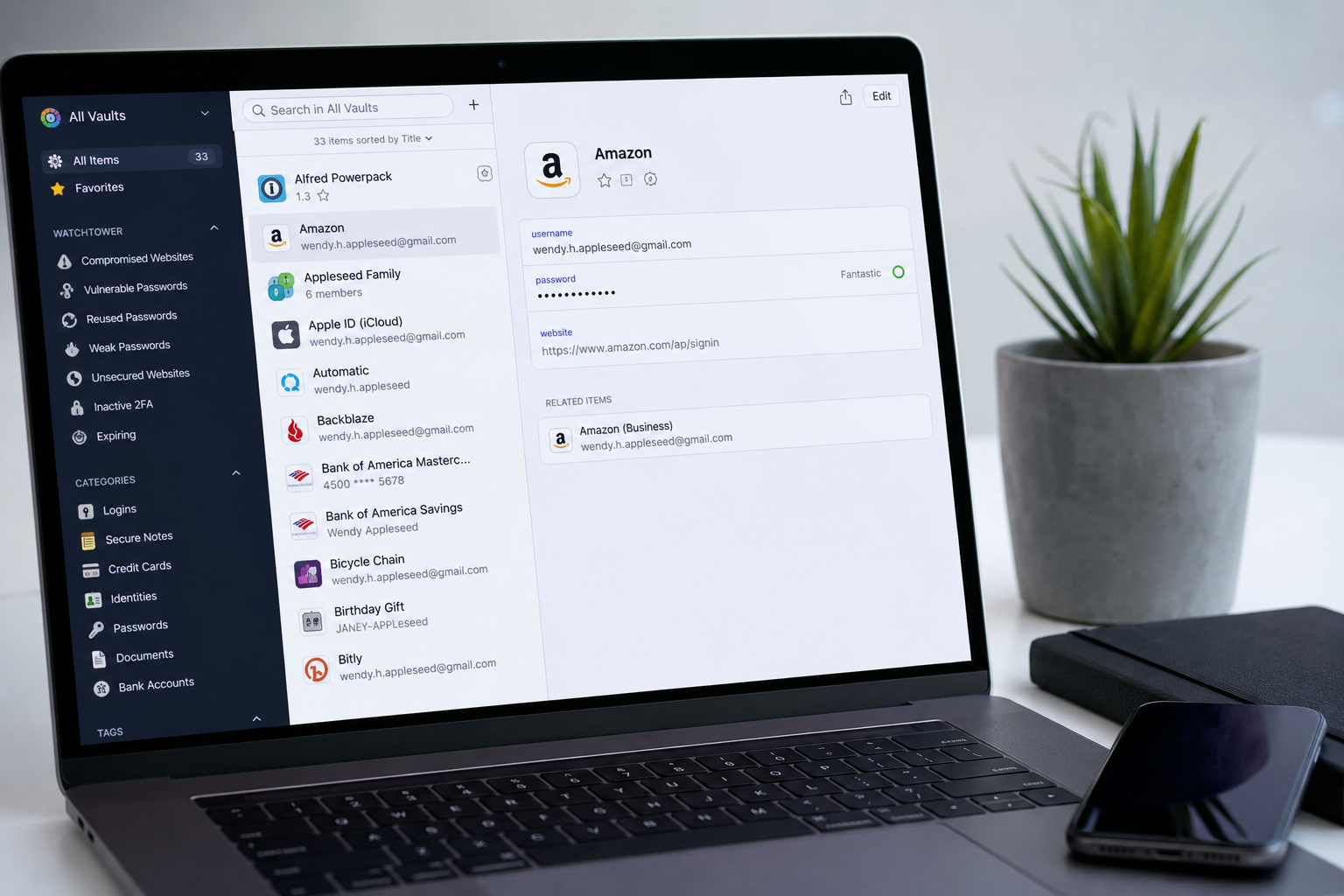
Top Password Managers for a Secure Digital Life: Protecting Your Online Identity in 2026
In today’s connected world, passwords are the first line of defense between our personal information and cybercriminals. From banking accounts and shopping platforms to social media profiles and professional tools, almost every part of our digital life depends on passwords. However, managing dozens of strong and unique passwords has become increasingly difficult. Many users still rely on simple passwords, reuse the same password across multiple platforms, or store them in unsafe places, creating serious security risks.
This is where password managers have become an essential digital security tool. A password manager helps users create, store, and manage complex passwords while protecting sensitive information through encryption. Instead of remembering multiple passwords, users only need to remember one master password to access their secure digital vault.
With growing cyber threats, data breaches, phishing attacks, and identity theft cases, choosing the right password manager can significantly improve online safety. Several password management tools are available today, each offering different features, pricing models, and security approaches. This article explores some of the top password managers that can help individuals and businesses build a safer digital lifestyle.
Why Password Managers Matter in Modern Digital Security
The average internet user now has accounts across dozens of websites and applications. Remembering a different, strong password for every account is almost impossible without assistance. As a result, many people create predictable passwords or repeat the same password across different services.
This habit creates a major security weakness. If one platform experiences a data breach, attackers can use leaked credentials to access other accounts. A password manager solves this problem by generating unique and complex passwords for every account and storing them securely.
Modern password managers also offer features beyond password storage. Many include two-factor authentication support, secure notes, payment information storage, identity protection tools, and alerts when a user’s information appears in a security breach.
1Password is one of the most recognized password managers in the cybersecurity industry. It is widely used by individuals, families, and businesses because of its strong security architecture and simple interface.
The platform uses end-to-end encryption to protect stored information, meaning sensitive data is encrypted before leaving the user’s device. Features like Watchtower help users identify weak passwords, reused passwords, and accounts affected by security breaches.
One of the biggest strengths of 1Password is its balance between security and usability. Many advanced security tools can feel complicated for everyday users, but 1Password focuses on making digital protection accessible. Its travel mode feature is especially useful for people who frequently travel, allowing users to temporarily remove sensitive data from devices during border checks or security situations.
For businesses, 1Password provides team management features, secure sharing options, and administrative controls, making it a popular choice among organizations that need to protect employee credentials.
Bitwarden has gained significant popularity because of its open-source approach and affordable pricing. Unlike many traditional password managers, Bitwarden allows security researchers and developers to review its code, increasing transparency and trust.
The platform provides password storage, password generation, secure sharing, and cross-platform synchronization. Users can access their vault through mobile apps, desktop applications, and browser extensions.
A major advantage of Bitwarden is its free plan, which offers many essential features without requiring a subscription. This makes it attractive for users who want strong password protection without spending money.
Bitwarden also appeals to privacy-focused users because of its self-hosting option. Advanced users and organizations can host their own Bitwarden server, giving them greater control over their data.
Dashlane is another leading password manager known for combining password management with additional cybersecurity features. It provides secure password storage, automatic password generation, and dark web monitoring.
The dark web monitoring feature helps users discover whether their email addresses or personal information have appeared in known data leaks. This allows users to take action before attackers misuse their information.
Dashlane also includes a built-in VPN feature in some plans, adding an extra layer of privacy when browsing online. Its clean interface makes it easy for beginners to manage passwords without dealing with complicated settings.
For users who want more than just password storage, Dashlane offers a broader security package designed to protect different aspects of online privacy.
NordPass is developed by Nord Security, the company behind NordVPN. It focuses on providing a simple and efficient password management experience.
NordPass uses modern encryption technology to secure user credentials and offers features such as password health checks, data breach scanning, and secure storage for personal information.
Its interface is designed for users who want a straightforward solution without unnecessary complexity. The platform supports multiple devices and browsers, making it convenient for people who switch between smartphones, tablets, and computers.
NordPass is particularly suitable for users who value simplicity while still requiring strong security standards.
Keeper is widely recognized as a security-focused password manager used by individuals, companies, and government organizations. It emphasizes strong encryption and advanced access controls.
The platform provides secure password storage, encrypted messaging, file storage, and security auditing tools. Businesses often choose Keeper because it offers detailed control over employee access and password-sharing permissions.
Keeper also provides features such as breach monitoring and emergency access, helping users prepare for different security situations.
For organizations managing sensitive information, Keeper offers a professional-level approach to credential protection.
LastPass has been one of the most widely known password managers for years. It offers password storage, automatic form filling, password generation, and secure sharing features.
Its popularity comes from its easy setup process and wide device compatibility. Users can quickly save passwords, organize accounts, and access credentials from different devices.
However, LastPass has faced security incidents in the past, which increased discussions around password manager security and the importance of choosing trusted providers. Despite this, the company continues to improve its security practices and remains a recognized name in the password management market.
For users deeply connected with the Apple ecosystem, Apple’s built-in password management system provides a convenient solution. Integrated across devices like iPhone, iPad, and Mac, it allows users to store passwords securely and autofill credentials.
Apple emphasizes privacy and uses encryption methods designed to protect user data. The system works seamlessly with Apple devices and reduces the need for third-party applications.
While it may not offer as many advanced features as dedicated password managers, it is a practical option for users who mainly use Apple products and want simple password protection.
How to Choose the Right Password Manager
Selecting the best password manager depends on individual needs. Security should always be the top priority, but factors like ease of use, pricing, device compatibility, and additional features also matter.
A good password manager should provide strong encryption, regular security updates, reliable synchronization, and transparent privacy policies. Users should also consider whether they need advanced features such as family sharing, business management tools, or identity monitoring.
Free options can be enough for basic users, while professionals and businesses may benefit from premium plans with advanced controls.
The Future of Password Security
The future of digital security is moving beyond traditional passwords. Technologies like passkeys, biometric authentication, and hardware security keys are becoming more common. Companies are gradually reducing dependence on passwords because they are vulnerable to phishing and human mistakes.
However, password managers will continue to play an important role during this transition. They provide users with a secure way to manage existing passwords while supporting newer authentication methods.
As people continue to spend more time online, protecting digital identity will become just as important as protecting physical belongings. A reliable password manager is no longer just a convenience tool; it is an important part of modern cybersecurity.
Final Thoughts
A strong digital security strategy starts with protecting account credentials. Password managers make it easier to create unique passwords, reduce security risks, and maintain control over personal information.
Whether someone chooses a premium solution like 1Password, an open-source option like Bitwarden, or a built-in solution like Apple Passwords, the most important step is adopting safer password habits.
In an era where online threats continue to evolve, using a trusted password manager is one of the simplest and most effective ways to build a more secure digital life.

Software Developer & Writer
Hey, I'm Diva, a developer and writer blending code and creativity. I'm driven by a deep curiosity and a relentless pursuit of excellence. Join me as I craft digital solutions and captivating stories.

Leave A Comment