
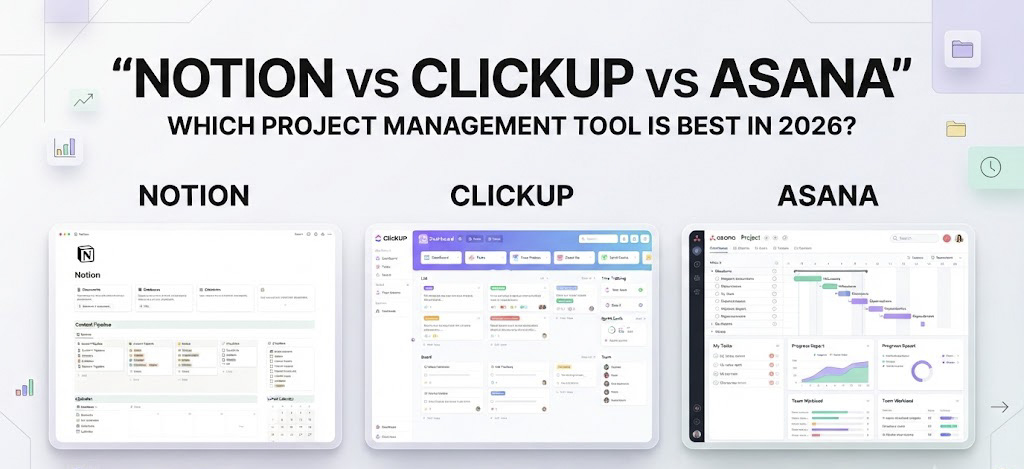
Notion vs ClickUp vs Asana: Which Project Management Tool Is Best for Your Team in 2026?
In a world where teams collaborate across time zones, manage multiple projects, and juggle an ever-growing list of responsibilities, choosing the right productivity software can make a significant difference. From planning marketing campaigns and organising company documents to tracking deadlines and coordinating remote teams, businesses need more than a simple to-do list. They need a workspace that brings people, information, and tasks together without making everyday work more complicated. This is where Notion, ClickUp, and Asana enter the conversation, each offering a different approach to modern project management.
Although these three platforms are often compared as alternatives, they are built around slightly different philosophies. Notion combines documentation, knowledge management, and flexible databases in one customisable workspace. ClickUp positions itself as an all-in-one productivity platform with extensive project management features, while Asana focuses on structured task coordination, project visibility, and team accountability. All three can help businesses improve collaboration, but the best choice depends on how a team works, the complexity of its projects, and the balance it wants between flexibility and structure.
For startups, digital marketing agencies, growing e-commerce businesses, and remote teams, understanding these differences is particularly important. The most effective productivity tool is not necessarily the one with the longest feature list. It is the one that fits naturally into a team’s workflow, reduces unnecessary administrative work, and makes it easier for everyone to understand what needs to happen next.
Notion: The Flexible Workspace for Ideas, Documents, and Projects
Notion has developed a strong reputation as a digital workspace where teams can bring their notes, documents, knowledge bases, and project information together. Rather than starting with a rigid project management structure, it allows users to build a workspace around their own needs. A marketing team might use Notion to maintain its content calendar, campaign briefs, brand guidelines, competitor research, and meeting notes, while a startup could organise product documentation, internal processes, and company goals in the same environment.
The platform’s biggest advantage is its flexibility. Pages can contain text, images, tables, databases, checklists, and linked information, allowing users to create connected systems instead of keeping everything in separate files. Its databases can display the same information in different formats, including tables, boards, calendars, and timelines. For example, a content marketing database can track article topics, publication dates, writers, keywords, and approval status, while a separate editorial calendar presents those same records according to their scheduled publishing dates. This interconnected approach makes Notion particularly useful for businesses that want to build a central source of information rather than manage isolated task lists.
Notion is also attractive to teams that value knowledge sharing. Important decisions, standard operating procedures, campaign insights, onboarding guides, and project updates can live alongside the work they support. New employees can use a central knowledge base to understand company processes, while existing team members can find project context without searching through scattered messages and documents. With AI-powered capabilities available in its ecosystem, Notion can also help eligible users search workplace information, summarise content, and work with documentation more efficiently, depending on their plan and enabled features.
However, Notion’s flexibility can become a disadvantage when a team needs highly structured project execution from the beginning. Building a sophisticated workspace often requires decisions about database properties, templates, permissions, views, and internal processes. Without clear ownership, different departments may create overlapping systems or design elaborate dashboards that become difficult to maintain. Notion supports task management and project planning, but teams with complicated dependencies, extensive reporting requirements, or large portfolios of projects may find that they need more configuration or complementary tools to achieve their preferred workflow.
For freelancers, content creators, small businesses, and teams that rely heavily on documentation, Notion can be an excellent choice. It is particularly effective when the main challenge is bringing information together and connecting ideas to the work that follows. Businesses seeking a highly structured operational system, however, should evaluate its project management capabilities against their actual requirements rather than assuming that a flexible workspace will automatically replace every specialised tool.
ClickUp: An All-in-One Platform for Complex Workflows
ClickUp takes a more comprehensive approach to productivity by bringing tasks, projects, documents, goals, dashboards, collaboration, and automation into a unified environment. Its central appeal is the ability to manage different stages of work without constantly switching between applications. Teams can create tasks, assign responsibilities, set priorities, establish due dates, track progress, and view projects through different layouts. For organisations managing numerous campaigns, clients, or departments simultaneously, this level of control can be particularly valuable.
One of ClickUp’s strongest features is its depth of project management functionality. Depending on the configuration and subscription plan, teams can work with task dependencies, custom fields, recurring tasks, workload views, time tracking, goals, and reporting dashboards. A digital marketing agency, for example, could manage several client accounts within the same workspace, assigning separate workflows to SEO articles, paid advertising campaigns, social media calendars, email marketing activities, and performance reports. Managers can use dashboards to monitor progress, identify overdue tasks, and understand where workloads may be becoming unbalanced.
ClickUp also offers considerable customisation. Teams can build workflows around their internal processes instead of adapting every project to a fixed template. A product development team may need sprints and dependencies, while an e-commerce team may focus on product launches, creative approvals, and promotional calendars. Both can organise their work within the platform while using different task fields, statuses, and views. ClickUp’s document and AI-related features can further support teams that want planning, execution, and selected knowledge-management activities to exist in one connected workspace.
The trade-off is complexity. Because ClickUp offers so many capabilities, the initial experience can feel overwhelming to new users. Teams may spend considerable time configuring folders, spaces, custom statuses, dashboards, notifications, and automation rules before settling into a consistent workflow. If every department customises the platform differently, reporting and collaboration can become less straightforward rather than more efficient. Excessive notifications and poorly designed dashboards can also create the very distractions that productivity software is supposed to reduce.
Another important consideration is that feature availability varies across ClickUp’s plans, and advanced functionality may require a paid subscription or additional usage allowances. Businesses should therefore examine the current plan limits for the features they genuinely need, rather than choosing a plan based solely on the platform’s overall feature list.
ClickUp is generally a strong fit for teams that manage several interconnected projects, require detailed reporting, or want to consolidate multiple work-management functions into one platform. Agencies, operations teams, growing businesses, and project-heavy organisations may benefit most from its breadth. For a small team with straightforward requirements, however, the additional flexibility may introduce unnecessary setup and maintenance.
Asana: Structured Project Management Built Around Accountability
Asana approaches productivity from the perspective of coordinated execution. Its core purpose is to help teams understand what work needs to be completed, who is responsible for it, when it is due, and how individual tasks contribute to broader goals. Instead of centring the experience on a flexible knowledge base or offering an exceptionally broad set of workspace configurations, Asana emphasises clarity, ownership, and visibility across projects.
Its project views, task assignments, due dates, timelines, dependencies, rules, and reporting capabilities help teams organise work in a structured way. A marketing department can create a campaign project with defined stages for research, strategy, creative production, approval, launch, and performance analysis. Every task has an owner and a deadline, while dependencies help clarify which activities need to be completed before others can begin. This structure is useful when a missed approval or delayed deliverable could affect an entire campaign schedule.
Asana is particularly valuable when several people or departments contribute to the same outcome. A product launch might involve marketing, design, sales, product development, and customer support. Each team has its own responsibilities, but project visibility helps stakeholders understand progress without relying entirely on meetings or manual status updates. Portfolio and reporting capabilities, where included in the selected plan, can help managers monitor multiple initiatives and identify work that needs attention. Asana’s goal-management approach can also connect day-to-day activities with broader business objectives, helping teams see beyond individual task completion.
Ease of adoption is another consideration. Teams that already understand task assignments, deadlines, project stages, and approval workflows may find Asana relatively straightforward to introduce. Its structured approach encourages consistent working practices, which can be valuable for organisations where accountability matters more than extensive customisation. Rules and automation can reduce repetitive administrative work, while integrations connect project coordination with other business applications.
Asana’s main limitation is that it may not be the most natural home for every kind of information. Although it supports project content and collaboration, teams that want a highly interconnected internal wiki, extensive research library, or deeply customised database system may prefer Notion’s approach. Similarly, businesses looking for a particularly broad combination of operational tools may find ClickUp’s feature set more appealing. Asana’s most advanced reporting, portfolio, automation, and AI capabilities may also depend on the subscription tier, so the total cost should be assessed against the team’s actual needs.
Asana is often a strong choice for medium-sized and large teams, cross-functional departments, and businesses that run repeatable projects with clear ownership and deadlines. It is especially useful when managers need a reliable overview of responsibilities and progress without building an entirely bespoke project management system.
Notion vs ClickUp vs Asana: The Key Differences
The most meaningful difference between these platforms lies in what they prioritise. Notion is designed around flexible information management, ClickUp brings together a wide range of work-management capabilities, and Asana concentrates on structured project execution. Their features overlap, but the experience of using each platform can feel quite different.
For documentation and knowledge sharing, Notion has a natural advantage because pages and databases are central to its design. It allows businesses to connect internal knowledge with ongoing projects, making it particularly suitable for content-heavy teams. ClickUp provides documents and related workspace features, but its broader emphasis is on managing work across multiple functions. Asana supports project information and collaboration, yet it is usually most compelling when teams need to coordinate tasks and responsibilities rather than build an extensive knowledge repository.
When it comes to advanced workflow customisation, ClickUp stands out for its combination of configurable task structures, views, dashboards, and project management capabilities. Notion offers substantial flexibility too, especially for database-driven workflows, but teams may need to create more of the system themselves. Asana takes a more structured approach, which can make it easier to maintain consistency across departments but may feel less adaptable to organisations with unusual operational requirements.
Project visibility is a strength shared by all three, although each approaches it differently. Notion makes it easy to build a custom overview using databases and linked pages. ClickUp provides a wide selection of task and reporting views, with functionality varying by plan. Asana focuses on making ownership, deadlines, dependencies, and project progress visible across teams. For managers coordinating large numbers of deliverables, the distinction between a customisable overview and a structured project dashboard can make a substantial difference.
Pricing also deserves careful attention. Each platform offers different subscription tiers, feature limits, and AI-related provisions, and these can change over time. A free plan may be enough for an individual or a small team, but advanced permissions, reporting, automation, collaboration controls, and AI features can affect the cost of scaling. Businesses should compare the current official pricing pages and calculate the cost for their expected number of users before committing. The cheapest entry-level option is not necessarily the most economical choice if the team eventually needs multiple additional applications to fill its gaps.
Which Tool Is Best for Different Types of Businesses?
The right project management software depends on the nature of the work, the number of people involved, and how much structure the organisation needs. A solo entrepreneur managing research, ideas, and business plans has different requirements from a marketing agency coordinating ten clients or an enterprise overseeing dozens of cross-functional initiatives. Evaluating these differences before selecting a platform can prevent unnecessary subscription costs and time-consuming migrations later.
For content creators, writers, and digital marketing professionals, Notion is a compelling starting point. It can bring together keyword research, article briefs, content calendars, campaign ideas, brand guidelines, and publishing schedules. For an editorial team producing content across multiple websites or social media channels, its connected databases can make the entire content pipeline easier to organise. ClickUp becomes more attractive when that same team needs detailed task assignments, workload management, recurring production workflows, and performance dashboards. Asana is a strong alternative when the priority is coordinating approvals, campaign deadlines, and responsibilities across multiple departments.
For agencies and client-service businesses, ClickUp’s extensive project management capabilities can help consolidate work across accounts, especially when each client has different deliverables and deadlines. Asana is equally worth considering for agencies that prioritise standardised processes, clear ownership, and dependable campaign coordination. Notion can complement either approach by serving as a central repository for client briefs, brand information, meeting notes, and strategic research.
Startups and small businesses may benefit from Notion when they are still developing their internal processes and need a flexible place to organise information. As their operations grow, they can evaluate whether a more structured project management system would improve accountability. Businesses with complex operational workflows from the outset may prefer ClickUp, while organisations with several teams working toward shared deadlines may find Asana’s structured approach easier to implement. Ultimately, the best solution is the one that employees will use consistently, rather than the platform with the most impressive feature catalogue.
The Role of AI in Modern Project Management Software
Artificial intelligence is becoming an increasingly important part of productivity software, changing how teams search for information, summarise discussions, automate routine work, and manage projects. Notion, ClickUp, and Asana are all developing AI-related capabilities, although their specific tools, availability, and usage limits depend on the product and subscription plan. For businesses evaluating these platforms in 2026, AI should be considered as part of the overall workflow rather than as a standalone reason to choose one application over another.
Notion’s AI-oriented features are particularly relevant to teams that work with large amounts of written information. Summarising documents, finding relevant internal knowledge, and assisting with content creation can reduce the time spent navigating extensive workspaces. ClickUp’s approach connects AI assistance with project tasks, documents, and productivity workflows, making it appealing to teams seeking support across different stages of execution. Asana’s AI capabilities focus on supporting work coordination, including tasks such as generating updates, summarising project information, and assisting with workflows where supported by the relevant plan.
However, the presence of AI does not automatically guarantee better productivity. Teams should assess whether these features solve a real problem, produce useful results, and integrate naturally into existing processes. Data permissions, privacy, accuracy, and subscription costs also matter, particularly for organisations handling confidential client information. A business that mainly needs a well-organised content calendar may not benefit enough from advanced AI features to justify a more expensive plan, while a large team managing extensive project portfolios might gain considerable value from intelligent summaries and automation.
Final Verdict: Notion, ClickUp, or Asana?
There is no universal winner in the Notion vs ClickUp vs Asana comparison because each platform solves a slightly different productivity challenge. Notion is best suited to people and teams that want a flexible digital workspace connecting documents, knowledge, ideas, and lightweight project management. ClickUp is a strong option for organisations seeking a feature-rich, highly configurable system for managing complex workflows and multiple projects. Asana is particularly effective for teams that need structured project planning, clear accountability, and visibility across departments.
Before making a decision, businesses should identify their three most important requirements, test those workflows in each platform, and consider how easily employees can adopt the system. It is also worth examining integrations, reporting needs, permission controls, mobile usability, and the total cost of ownership as the organisation grows. A short pilot project often reveals more about a platform’s suitability than a long list of advertised features.
The broader lesson is that productivity software should simplify work, not create another layer of work to manage. Notion helps teams organise what they know, ClickUp gives them extensive tools to manage what they do, and Asana helps them coordinate who does what and when. Understanding that distinction makes it easier to select the right tool for the business today while leaving room for future growth.

Software Developer & Writer
Hey, I'm Diva, a developer and writer blending code and creativity. I'm driven by a deep curiosity and a relentless pursuit of excellence. Join me as I craft digital solutions and captivating stories.




Leave A Comment